
How to Make Anki Cards From Lecture Slides with AI (Without a Bloated Deck)
A med student workflow to turn lecture slides into Anki cards with AI: a drafting prompt, pruning rules, image occlusion, CSV import and cards per lecture.
Contents (15 sections)
To make Anki cards from lecture slides with AI, mark what your lecturer stressed, let the AI draft cards from the slides, then prune hard: one fact per card, cloze for facts, basic for mechanisms, image occlusion for diagrams, a lecture tag and the slide number on every card. AI removes most of the typing; it does not remove the need to check. Below you will find the workflow, a real before-and-after on one slide, how to pick a tool, CSV versus .apkg import, image occlusion for slide diagrams, how many cards per lecture is reasonable, and how to combine your lecture cards with AnKing.
Key points
- Cards from your own lectures match faculty-written exams; big pre-made decks often do not.
- Expect to delete or rewrite a real share of any AI draft. That pruning is where the learning starts.
- Control the daily load with the new-card limit, never by skipping reviews.
Why make cards from your own lecture slides
Large pre-made decks are built for standardised exams. Most medical school exams are written by your own faculty, and their emphasis, classifications and examples come from their slides. Cards built from those slides test what your exam is likely to test, in the same words. If your school uses faculty-written block exams, the companion guide on how to study for in-house exams covers the rest of the lecture workflow.
The evidence for flashcards is strongest at the level of principles. Retrieval beats rereading (Karpicke and Roediger, 2008). In a randomised study of 80 medical students, Schmidmaier and colleagues (2011) found that re-testing with electronic flashcards beat re-studying at one week, but the advantage had gone at six months: testing needs spacing to last. Spaced questions sent after a clerkship improved end-of-year retention in a randomised trial by Kerfoot and colleagues (2007). Evidence on Anki itself is observational: Deng, Gluckstein and Larsen (2015) found that unique Anki cards seen were associated with USMLE Step 1 scores in 72 students, and Wothe and colleagues (2023) reported an association between daily Anki use and Step 1 scores in 165 students.
Tool options: what kind of tool to use
Most pages ranking for this topic are written by the companies selling the tools, and some quote how many hours the manual method takes without saying where the number comes from. Here is a neutral way to compare the four main routes. The feature that matters most is not speed; it is how quickly you can check each card against its source slide.
| Route | Good for | Watch out for | Look for |
|---|---|---|---|
| General chatbot + your prompt | Occasional use, full control of the rules | Copy-paste limits, long answers, invented facts, no link back to the slide | A strict prompt (below) and CSV output |
| Dedicated slides-to-Anki generator | Batch drafts from PDF or PPTX | Card volume inflated to look generous; image slides handled poorly | Source slide shown next to each card; editable before export |
| All-in-one study app | Cards plus summaries, quizzes and practice from the same files | Lock-in if you cannot export | Anki export, source references, a review step |
| Manual in Anki (plus add-ons) | Anatomy, histology, anything visual | Time | Built-in image occlusion; a good note type with an Extra field |
Manual or AI, which is faster overall? AI removes the typing, but the pruning and checking stay with you, and for image-heavy lectures the manual route loses less than you would think. The honest test is to time yourself on one real lecture both ways and compare the kept cards, not the generated ones. If you are still choosing a general tool, the AI study assistant guide has a one-chapter acceptance test you can reuse.
The lecture-to-Anki workflow
- Same day, mark the slides: highlight what the lecturer emphasised or repeated. This is the one input AI cannot infer.
- Generate a draft from the slides (and the lecture transcript if you have one), asking for short cards with the slide number in an Extra field.
- Prune: delete trivia, split long answers, merge duplicates, check every number.
- Add image occlusion for anatomy, histology and pathway diagrams.
- Tag and import: hierarchical tags such as cardio::pharm::lecture05, then import into Anki.
- After a week, repair leeches: rewrite or split the cards you keep failing.
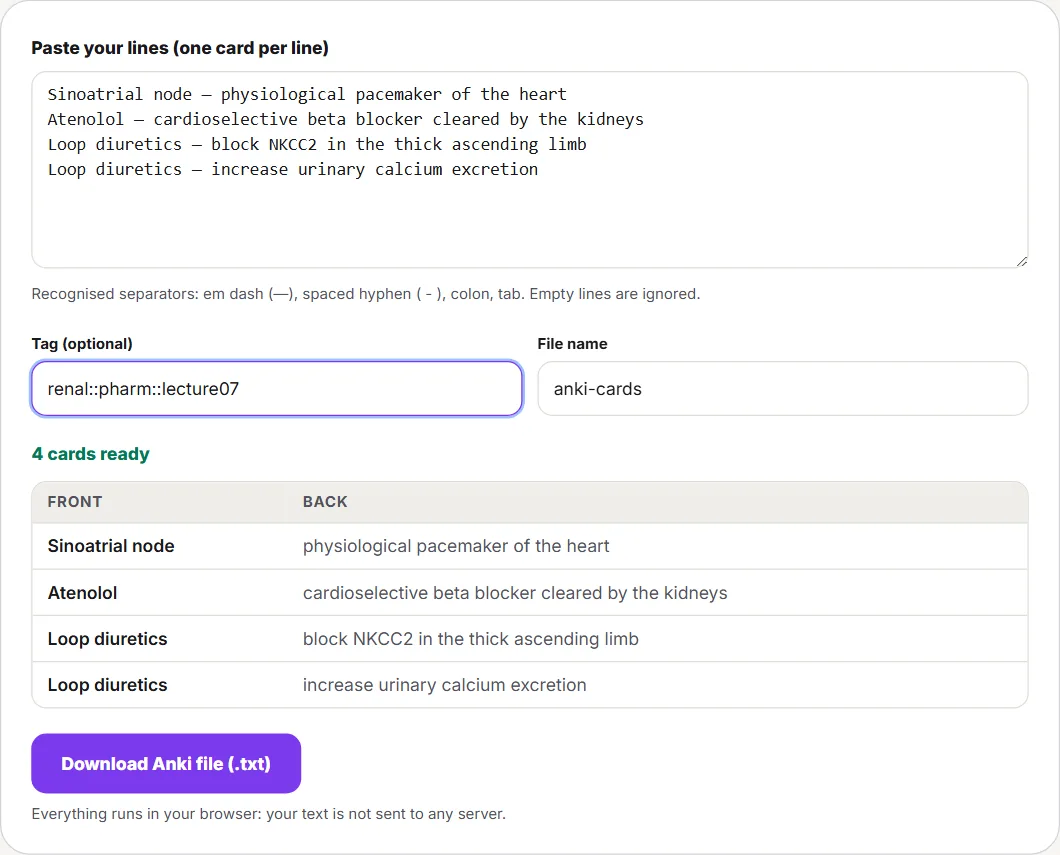
If you already have "term - definition" lines, the free slides to Anki converter turns them into an importable file in your browser, without an account. Starting from PDF handouts instead? See PDF to flashcards.
Worked example: one slide, before and after pruning
Example A self-made text slide from a renal pharmacology lecture reads: "Loop diuretics (e.g. furosemide): inhibit the Na-K-2Cl cotransporter (NKCC2) in the thick ascending limb of the loop of Henle. Increase urinary calcium excretion. Adverse effects: hypokalaemia; ototoxicity at high doses." The lecturer stressed the calcium point, because thiazides do the opposite. Here is a typical AI draft and what happens to each card.
| AI draft | Decision | Final card |
|---|---|---|
| "What do loop diuretics do?" | Rewrite: vague prompt | "Transporter blocked by loop diuretics?" - Na-K-2Cl cotransporter (NKCC2) |
| "Where in the nephron do loop diuretics act?" - thick ascending limb of the loop of Henle | Keep | Unchanged |
| "Describe loop diuretics." - a five-line paragraph | Delete: covered by the other cards, impossible to grade | - |
| "Loop diuretics {{c1::increase}} urinary calcium excretion." | Keep: the lecturer stressed it | Unchanged; Extra: "thiazides decrease it" |
| "Adverse effects of loop diuretics?" - hypokalaemia, ototoxicity | Rewrite: list card | "Electrolyte disturbance typical of loop diuretics?" - hypokalaemia (ototoxicity gets its own card only if your lecturer tests it) |
| "Which company first marketed furosemide?" | Delete: not on the slide, not examinable | - |
Two minutes of pruning turned six cards into four sharper ones, and one of the deletions caught an invented fact. That is the realistic value of AI here: a fast first draft that you are still responsible for.
Card rules, with medical examples
Piotr Wozniak's "minimum information principle" still sums it up: each card should ask one simple thing.
| Weak card | Why it fails | Better version |
|---|---|---|
| "Describe beta blockers." | Paragraph answer; you cannot grade yourself | "Cardioselective beta blocker mainly cleared by the kidney?" - atenolol |
| "Adverse effects of ACE inhibitors" (five items) | List cards are failed and relearned as a block | One card per effect, e.g. "ACE inhibitor side effect caused by bradykinin?" - dry cough |
| "The {{c1::brachial plexus}} arises from {{c1::C5-T1}} and has {{c1::five}} parts." | Several blanks at once | Separate clozes (c1, c2, c3) or an image occlusion of the plexus diagram |
| "Frank-Starling?" | Vague prompt | "Increasing end-diastolic volume, within limits, does what to stroke volume?" - increases it |
Use cloze for definitions, values and names, basic for "why" and "how", and image occlusion for anything labelled. A deck of only clozes trains you to recognise sentences, not to reason.
Image occlusion for slide diagrams
Since version 23.10, Anki includes image occlusion as a built-in note type, so you no longer need an add-on. AI tools are still unreliable on labelled images, which makes this the step worth doing by hand.

- Screenshot the diagram from the slide, cropped to the part you need.
- In Anki, click Add and choose the Image Occlusion note type, then select the screenshot.
- Draw a shape over each label you want to recall. Each shape becomes its own card.
- Choose how the other labels behave while you answer (hidden or visible). Hiding them all is harder and better for structures that are easy to guess by position.
- Add the lecture tag and slide number in the extra field, as for any other card.
CSV or .apkg: how to import
| CSV / TXT (text file) | .apkg (Anki package) | |
|---|---|---|
| What it contains | One note per row, fields in columns | Decks, notes, note types, cards and media |
| Best for | AI drafts and your own lists | Sharing a finished deck, or moving one with images |
| You control | Separator, field mapping, tags, deck | Little: you import what the author built |
| Duplicates | Handled by the import options | Anki recognises notes already in your collection from a previous import |
For AI drafts, text files are the practical choice. Recent versions of Anki also read optional headers at the top of the file, such as #separator, #html, #tags and #columns, so a file can go straight into the right deck with the right fields.
- Save as UTF-8 so accents and symbols survive.
- Use one separator (comma, semicolon or tab) consistently.
- Map Front, Back, Extra and Tags in the import window.
- Enable HTML only if your cards contain formatting.
- Import into a lecture sub-deck or tag, so you can suspend or review it as a block.
How many Anki cards per lecture?
A fixed number does not exist, but "it depends" is not an answer either. Use the lecture type as a starting range, then let one week of real review time correct it.
| Lecture type | Starting range | Mostly |
|---|---|---|
| Introduction or overview | 5-15 cards | Definitions and classifications |
| Mechanism-heavy (physiology, pathology) | 10-20 cards | Basic "why/how" cards; keep long explanations for out-loud practice |
| Fact-dense (pharmacology, microbiology) | 20-40 cards | Cloze for names, targets, adverse effects |
| Visual (anatomy, histology) | 15-30 cards | Image occlusion |
Two controls keep it sustainable. First, cap new cards per day in the deck options: every new card creates reviews for weeks. The Anki manual gives a useful rule of thumb: if you consistently learn 20 new cards a day, expect roughly 200 reviews a day. Second, watch your review time for a week before raising the cap. With FSRS, the scheduler built into Anki since 23.10, the default desired retention is 90%; the manual warns that above 90% the workload increases very quickly, and above 97% it can be overwhelming. To fit reviews around a fixed exam date, see the spaced repetition schedule for exams.
Worked example: a week's card budget
Example A second-year week with five lectures, using the starting ranges above:
| Lecture | Type | Cards kept after pruning |
|---|---|---|
| Pharmacology 1 and 2 | Fact-dense | 2 × 30 = 60 |
| Physiology 1 and 2 | Mechanism-heavy | 2 × 15 = 30 |
| Anatomy | Visual (image occlusion) | 20 |
| Week total | 110 cards, about 16 new cards a day over 7 days |
Scaling the manual's rule of thumb (20 new cards a day, roughly 200 reviews a day) down to 16 gives on the order of 160 reviews a day once the deck is running. That is a rough proportion, not a prediction: time a few days of your own reviews and multiply. If your average is 10 seconds a card, 160 reviews take about 27 minutes before any new cards. If that does not fit next to lectures, lower the new-card limit or keep fewer cards per lecture; do not start skipping reviews. To place whole topics, not single cards, around the exam date, plan topic reviews around the exam date.
Combining your lecture cards with AnKing
Many US students already use AnKing, a large community deck mapped to board exams. You do not have to choose. A common hybrid is:
- Keep AnKing suspended by default, then unsuspend only the cards whose tags match the lecture you just had.
- Make lecture cards only for the gaps: details, classifications or examples your lecturer stressed that the unsuspended cards do not cover. Often that is a handful per lecture, not a full deck.
- Tag your own cards differently (for example #lecture::renal::07) so you can review them as a block before the in-house exam.
- When the two disagree, your lecturer's version wins for the in-house exam; note the difference in the Extra field.
Ten-minute quality check before studying a new batch
- Every number matches the slide.
- No card needs the original slide to make sense.
- No answer is longer than a line.
- Near-duplicate cards are merged or deleted.
- Each card has a lecture tag and the slide number.
Leech repair table
A leech is a card you keep forgetting. By default, when a card has lapsed 8 times Anki tags the note as a leech and suspends the card, and the manual's advice is to change how the information is presented, delete it if it is not worth the time, or wait while you learn a confusable card first. In practice, the symptom tells you which fix to use:
| What you notice | Likely cause | Fix |
|---|---|---|
| You recall part of the answer, never all of it | A list or several facts on one card | Split into one card per fact, or separate clozes (c1, c2, c3) |
| You mix it up with a similar card | Interference (e.g. loop vs thiazide diuretics) | Add the contrast in Extra, make one "difference" card, or suspend one of the pair until the other is solid |
| You know it on the slide, not on the card | The card depends on the slide's context | Rewrite the front so it stands alone; add the slide number and a cropped image |
| You recognise the wording, then blank in questions | A cloze of a memorised sentence | Turn it into a "why" or "how" basic card, or explain it out loud instead |
| You fail it and it is not examinable | Trivia that slipped through pruning | Delete it |
How to do this with Memoniq
Memoniq generates flashcards from the slides, notes, recordings or YouTube lectures you upload to a notebook, alongside a summary, written-exam quizzes and a daily spaced-repetition review in the app. On the Student plan you can export the cards for Anki as text or CSV and keep studying them with Anki's scheduler, FSRS included. The first 14 days after sign-up include Student features, with no card required.
Treat the output as a draft: apply the pruning rules above, delete what you do not need and check facts against your slides, because AI can make mistakes.
Limits
Flashcards train recall of facts; they do not train clinical reasoning or explaining a topic out loud, so pair them with questions and oral practice. AI extraction is weaker on image-heavy slides and on anything the lecturer said but did not write. The card ranges above are a starting heuristic, not data. The Anki-specific studies cited are observational and from US schools.
Sources
- Anki - Changes in 23.10 (built-in image occlusion and FSRS)
- Anki Manual - Importing text files
- Anki Manual - Packaged decks (.apkg)
- Anki Manual - Editing, note types, cloze and image occlusion
- Anki Manual - Deck options and FSRS
- AnkiHub Community - Suspend/unsuspend cards
- Wozniak P. - Twenty rules of formulating knowledge
- Schmidmaier R et al. (2011), Using electronic flashcards to promote learning in medical students: retesting versus restudying, Medical Education
- Deng F, Gluckstein JA, Larsen DP (2015), Student-directed retrieval practice is a predictor of medical licensing examination performance
- Wothe JK et al. (2023), Academic and wellness outcomes associated with use of Anki spaced repetition software in medical school
- Kerfoot BP et al. (2007), Spaced education improves the retention of clinical knowledge by medical students
- Karpicke & Roediger (2008), The critical importance of retrieval for learning, Science
Frequently asked questions
How do I make Anki cards from lecture slides?
Mark what the lecturer emphasised, generate a draft from the slides with strict rules (one fact per card, slide number in an Extra field), prune it, add image occlusion for diagrams, then import it into Anki as a CSV or text file.
What's the best AI tool to turn slides into Anki cards?
Judge tools by how easily you can check each card against its source slide, whether you can edit before export, and whether they export to Anki. Speed and card volume matter less than verification.
Can AI make good Anki cards?
It produces useful drafts from text slides quickly, but it tends to write long answers, cannot know what your lecturer stressed and can add or change facts. Prune before studying.
How many Anki cards should I make per lecture?
Start from the lecture type: roughly 5-15 for an overview, 20-40 for a fact-dense pharmacology lecture. Then cap new cards per day and adjust after a week of real review time.
Should I use AnKing or make my own cards for lectures?
Many students combine them: keep AnKing suspended, unsuspend cards that match each lecture, and write their own cards only for what the lecturer stressed that AnKing does not cover.
How do I make image occlusion cards from slides?
Screenshot the diagram, choose the built-in Image Occlusion note type in Anki (version 23.10 or later), draw a shape over each label and add the lecture tag and slide number.
Should I make Anki cards before or after the lecture?
After, ideally the same day: you need to know what the lecturer stressed, and processing the lecture while it is fresh takes less time. Skimming the slides beforehand helps you notice that emphasis.
Can AI make image occlusion cards from slides?
Some tools try, but labelled diagrams are where AI extraction is weakest. Anki's built-in Image Occlusion note type lets you mask each label by hand in a few minutes, which is usually more reliable.
How many new Anki cards per day can I handle?
The Anki manual's rule of thumb is that 20 new cards a day leads to roughly 200 reviews a day. Start lower during heavy lecture weeks and adjust after a week of real review time.
What should I do with Anki leeches from lecture cards?
By default Anki tags a card as a leech and suspends it after 8 lapses. Fix it by symptom: split cards that hold several facts, add a contrast card for look-alike topics, rewrite fronts that only make sense next to the slide, and delete leeches that are not examinable.
Should I import a CSV or an .apkg file?
Use CSV or text files for AI drafts and your own lists, because you control fields and tags. An .apkg package is for sharing finished decks, including note types and media.
Keep reading
How to Study for In-House Exams in Medical School
In-house exams are written from your lectures. A per-lecture workflow, an AnKing decision tree, a sample lecture-day schedule and how pass/fail changes the balance.
How to Prepare for a Medical Viva Exam: Structures, Questions and a 4-Week Plan
An answer ladder you can say out loud, 16 classic viva questions with outline answers, a four-week plan, a five-criterion rubric and a safe way to practise with an AI examiner.
AI Study Assistant: How to Choose One and Study Better
Choose an AI study assistant by what you need to learn. A practical guide to free tools, source checks, PDFs, flashcards, prompts and better exam practice.
Roberto Coscia
Nursing graduate (BSc) · Founder of Memoniq
Sources are cited and checked at the end of the article. Medical content is educational: always verify against your course material. About the author · Editorial policy
Last updated: September 25, 2026