
AI Study Assistant: How to Choose One and Study Better
What an AI study assistant can and cannot do: compare options, test accuracy on one chapter and run a 30-minute practice session with copyable prompts.
Contents (16 sections)
An AI study assistant is software that helps you learn by explaining concepts, organising course material, and creating practice questions or flashcards. The useful version works with your actual syllabus and makes you retrieve an answer before showing its explanation. It can prepare the practice; it cannot do the learning for you.
This guide helps you choose a tool, test its accuracy, and run a study session with your own notes. It is published by Memoniq, an AI exam-preparation app. The comparison below describes suitable uses, not an independent ranking or a claim that one product is best for everyone.
Try the Memoniq study demo without signing up, or start with the workflow below and use it in the tool you already have.
What does an AI study assistant actually do?
Most study assistants combine a language model with tools for handling documents and practice activities. When you upload a file, the app extracts usable text; some products can also process images or audio. It then uses that material and your instructions to produce explanations, questions, or study notes. File support and source referencing vary, so an upload succeeding does not prove that every page or diagram was understood.
- Understand: explain an unfamiliar idea, contrast similar concepts, or offer a simpler example.
- Organise: turn notes into an outline, list prerequisites, and identify topics to check against the syllabus.
- Practise: generate recall questions, worked problems, flashcards, or mock oral questions.
- Review: discuss a wrong answer and help plan what to revisit.
An AI tutor emphasises back-and-forth teaching. An AI note-taking app emphasises capturing and organising information. A flashcard app emphasises repeated retrieval. An AI study assistant may combine these jobs, but the label alone tells you little about the quality of any one of them.
Which AI study assistant is best for you?
Choose by the task that currently blocks your learning. If you do not understand the concept, a larger flashcard deck will not fix it. If you understand it while reading but cannot answer unaided, another summary is unlikely to solve the problem.
| Your main task | A starting option | What to test before committing |
|---|---|---|
| Ask follow-up questions and learn through dialogue | ChatGPT Study Mode | Does it wait for your attempt, give an appropriate hint, and stay within the material you supplied? |
| Explore uploaded sources and make study activities | Google's notebook tool, commonly searched as NotebookLM | Do the cited passages support the answer? Are the relevant sources selected for the quiz or flashcards? |
| Move from course files to summaries, flashcards, quizzes and exam practice | Memoniq | Is the topic coverage useful, can you correct the material, and does your chosen plan include the study modes you need? |
| Review an already accurate collection of facts over time | A spaced-repetition flashcard app | Can you edit the cards, schedule reviews and practise without recognising the answer from its wording? |
| Check a complex calculation or proof | Course solutions and a suitable mathematical tool, with AI for explanations | Are assumptions, units and intermediate steps correct? Can you solve a fresh problem without help? |
OpenAI documents Study Mode as supporting guided study, practice questions and uploaded material when file uploads are available. It can still make mistakes or give an answer too early. Google's current flashcard and quiz documentation uses the name Gemini Notebook. It supports these activities too; describing NotebookLM as only a summariser would be misleading.
For a closer comparison with Memoniq, see our exam-preparation workflow comparison. Check current product documentation for availability and limits rather than choosing from an old feature checklist.
Is a free AI study assistant enough?
A free plan can be enough to test one chapter and practise a small topic. Whether it covers a whole course depends on upload limits, generation limits, source length and the activities you need. A free trial, a permanent free plan and unlimited free use are different offers.
Before paying, try the full loop: upload a representative source, generate a short outline, correct one mistake, answer a few questions, and return for another session. Check whether your limit resets daily or monthly, whether large files consume extra allowance, and whether exports or voice practice need a paid plan.
Memoniq offers a free plan with managed AI and usage limits; you do not need to bring an API key to start. Advanced modes and exports depend on the plan. See current Memoniq pricing and limits before choosing. If you already have accurate notes and a working review routine, you may not need another subscription.
How to use an AI study assistant: a 30-minute workflow
This is a suggested session structure, not a scientifically optimal time split. Use a small topic you can check against an authoritative course source. Keep that source open beside the assistant.
1. Set the scope (3 minutes)
Add one lecture or chapter, its learning objectives and the exam format. Tell the assistant which material is authoritative. If your lecturer and textbook disagree, ask it to flag the difference. Do not ask it to silently choose an answer.
2. Build a topic map (5 minutes)
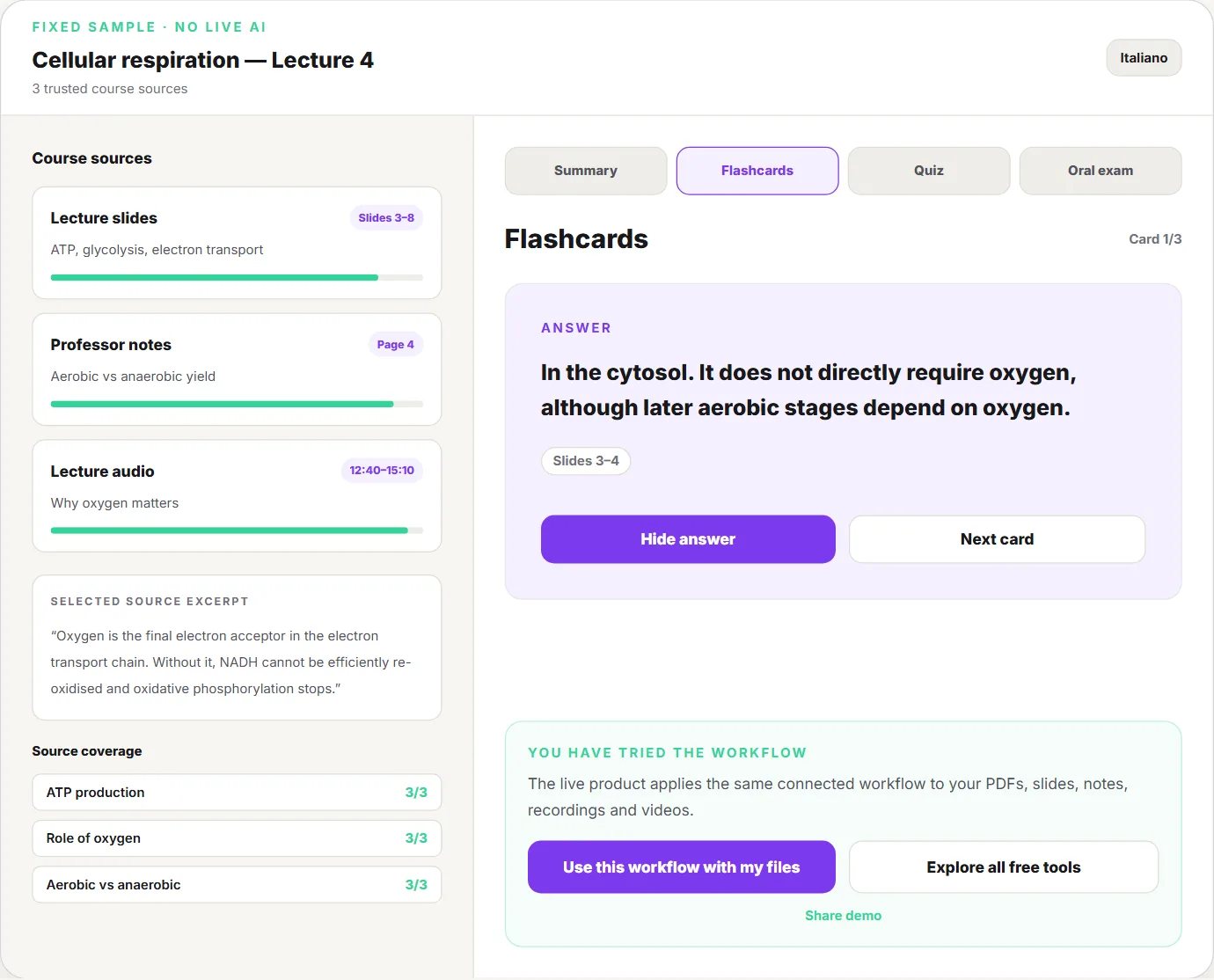
Ask for the main ideas, prerequisites and exceptions. Compare the outline with your syllabus. Add anything missing before generating detailed notes. With a large source collection, use the multi-file coverage workflow to avoid losing topics between documents.
3. Explain one difficult idea (7 minutes)
Request a definition, a mechanism or reasoning chain, and one relevant example. Then close the explanation and say it in your own words. If you can only repeat its wording, ask for a different example and explain why the same principle applies.
4. Answer before revealing (10 minutes)
Answer three to five questions without notes. Include an application question rather than only definitions. Ask the assistant to withhold the answer until you respond, identify the first incorrect reasoning step, and show the supporting source passage. A correct multiple-choice selection is not enough if you cannot explain it.
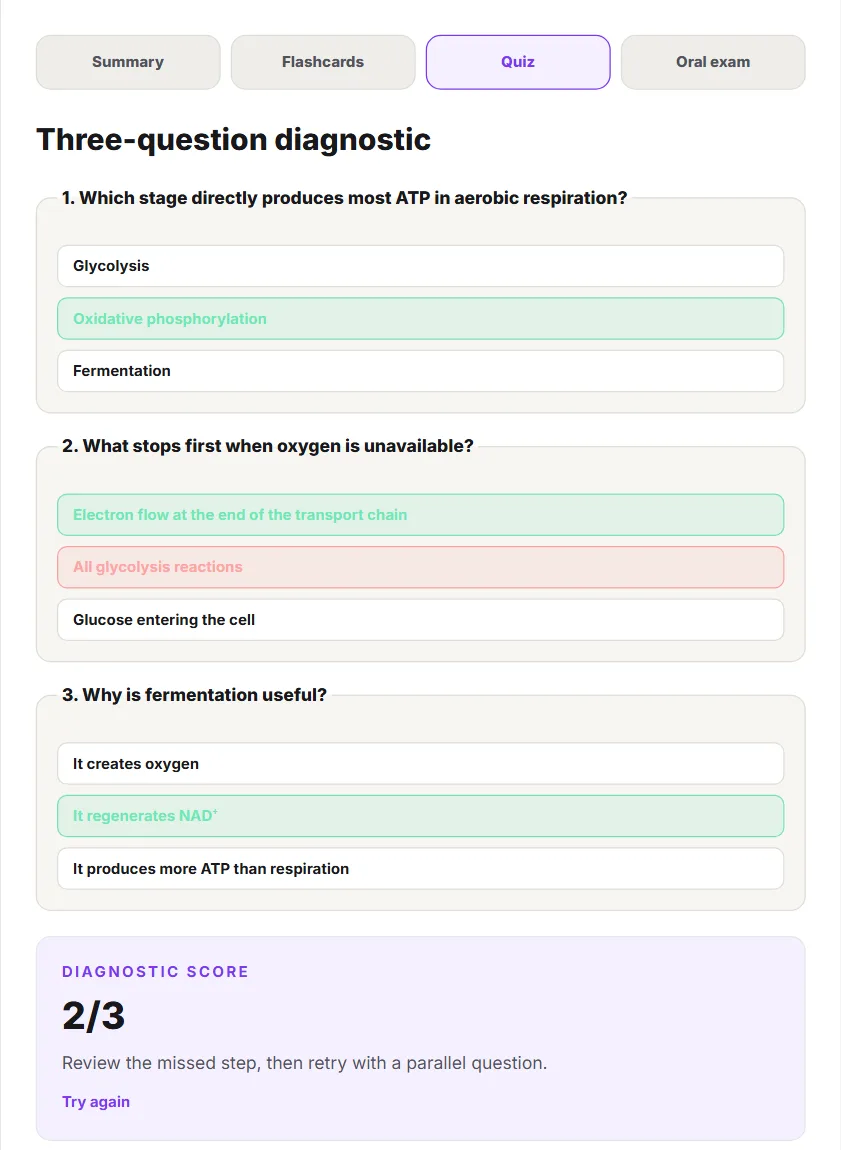
Above, the same step in a fixed sample notebook: the answers are chosen first, then checked, and the score comes with one instruction (review the missed step, retry with a parallel question) rather than just a number. Answer the same three questions yourself before reading on; it takes a minute and needs no account.
5. Correct and schedule (5 minutes)
Check the feedback in the source. Write one concise correction for each important mistake and choose what to retrieve next time. Use a free spaced-repetition schedule to place reviews around the time you actually have. End the session with a short weakness list, not another unread document.
A worked example: turn a definition into understanding
Illustrative study example: suppose your introductory economics notes distinguish a movement along a demand curve from a shift of the curve. A weak assistant output is a long definition followed by a card that asks you to repeat it. A useful session makes you decide which situation you are looking at.
- Explanation: separate a change in the good's own price from a change in another determinant, keeping the model's assumptions explicit.
- Question: “The price of this good falls while other determinants stay fixed. Would you move along the existing demand curve or draw a new curve? Explain.”
- Your attempt: answer before opening the explanation or looking at a diagram.
- Correction: if you confuse quantity demanded with demand, return to the distinction in your course notes and explain it using a different example.
- Transfer: change a different determinant and justify the resulting diagram, stating any necessary assumptions.
The payoff is a decision you can make independently. Use a labelled diagram to display the distinction, but keep the explanation and assumptions next to it. A picture without that reasoning can hide the same misunderstanding as a paragraph.
Five prompts you can copy into an AI study assistant
Replace the bracketed text with your course details. These are instructions to test, not guarantees of accurate or source-only output.
Make an outline that preserves coverage
Use the uploaded [lecture/chapter] and these learning objectives: [objectives]. List the concepts I need for a [written/oral/problem-solving] exam. Put prerequisites first. Preserve classifications and exceptions. For each concept, identify its source location if available. Flag anything missing or unreadable instead of filling it in from memory.
Explain a concept without overwhelming me
Explain [concept] for a student who understands [prerequisite]. Start with the core idea, then the reasoning, one example and one important limitation. Use short sections. Separate what comes from my notes from any added explanation. Finish by asking me to explain it back; wait for my answer.
Quiz me one question at a time
Use [source and section] to ask me five questions: two recall, two application and one about an exception. Ask one question at a time and do not reveal the answer until I respond. Check my reasoning against the source. If the source does not establish an answer, say so.
Make flashcards worth reviewing
Create a small set of flashcards from [section]. Test one important idea per card. Make the question specific and the answer concise but complete. Avoid vague prompts, duplicated facts and wording that gives away the answer. Include relevant conditions or exceptions and source locations where available.
Diagnose a wrong answer
Here is the question, my answer and the course solution: [paste]. Identify the first point where my reasoning diverges from the solution. Give me a hint before the correction. Then ask a parallel question that tests the same idea with a changed example.
For spoken assessments, use the oral-exam practice guide to add follow-up questions and a feedback rubric. If your flashcards end up in Anki, the guide on making Anki cards from lecture slides shows how to prune an AI draft before you study it.
Can you trust the answers? Use this acceptance test
Source-grounded does not mean error-free. An assistant can miss a footnote, misread a scan, join claims from different contexts, or attach a citation that does not support its answer. “Are you sure?” is a weak check: an incorrect answer can simply be repeated with more confidence.
Use one source you already understand and assess the following before relying on the tool for unfamiliar material:
- Coverage: does it preserve the learning objectives, complete classifications, and relevant exceptions?
- Evidence: can you find the exact passage supporting three important claims?
- Uncertainty: ask something the source does not contain. Does it identify that limit?
- Practice quality: do its questions have unambiguous answers and match the reasoning your exam requires?
- Correction effort: can you edit or repair the material without rebuilding everything?
Record a simple pass, needs correction, or fail for each item. This is an editorial checklist, not a validated scoring instrument. A fabricated citation or repeated substantive error is a reason to change the source, prompt or tool before proceeding. Keep the original material available even after a successful test.
Acceptance test scorecard
Copy this into a note and fill it once per tool, on the same source. The verdict column is what you act on.
| Check | How to test it (about 5 minutes each) | Pass | Needs correction | Fail |
|---|---|---|---|---|
| Coverage | Compare its outline with the learning objectives, line by line | All objectives, classifications complete | One item missing or merged | Several items missing |
| Evidence | Open the cited passage for three important claims | 3 of 3 supported | 2 of 3 | 1 or 0, or a citation that does not exist |
| Uncertainty | Ask one thing the source does not contain | Says it is not in the source | Hedges but adds outside facts | Answers confidently anyway |
| Practice quality | Answer five of its questions | Unambiguous, exam-style | One ambiguous or trivial | Mostly recall of its own wording |
| Correction effort | Fix one wrong item | Edit in place | Regenerate one section | Rebuild everything |
One "Fail" on evidence or uncertainty is enough to stop and change the source, prompt or tool before you study unfamiliar material with it. As above, this is an editorial checklist, not a validated instrument.
Can AI study assistants handle PDFs, slides and lecture recordings?
Many can, but the format is only the first hurdle. Text-based PDFs are different from scans; a slide can communicate its key point through a chart that text extraction misses. Audio can contain misunderstood names or missing context from what was written on the board.
- Scanned PDFs or handwriting: check recognition on a difficult page, especially symbols and equations.
- Slides with diagrams: compare labels and relationships with the original visual.
- Recordings: check the transcript against a short passage and keep timestamps for uncertain terms. Get any required permission before recording or uploading a class.
- Long or mixed files: split by coherent topic, retain a source inventory, and audit coverage across the full syllabus.
Memoniq accepts several course-source formats and provides a connected notebook workflow. For a focused starting point, see AI PDF summaries for students or turning a PDF into flashcards. Check extraction quality before investing time in generated material.
How should the workflow change by subject and exam format?
- Maths, physics and engineering: solve first, then use the assistant to explain a stuck step. Check units, assumptions and edge cases against worked solutions. Include fresh problems, not only variations you can recognise.
- Biology, medicine and other content-heavy courses: learn mechanisms and complete classifications before compressing facts into cards. Use diagrams for relationships and questions for recall. Medical students with faculty-written exams can follow the lecture-first method in how to study for in-house exams.
- Law and humanities: distinguish the rule or argument, its evidence, competing interpretations and its application. Verify quotations and references in the original text.
- Language learning: practise producing sentences, ask for a correction with an explanation, then reuse the pattern in a new context.
- Oral exams: answer aloud, handle a follow-up and explain an exception. A polished written summary does not test spoken performance.
Study in the language of your assessment when possible. Ask for explanations and practice questions in that language, while preserving technical terms your course requires. Translation can change meaning, so check specialised terminology rather than assuming fluent wording is equivalent.
Does studying with AI improve learning?
The useful distinction is between a study method and the tool that delivers it. Dunlosky and colleagues' review of learning techniques rated practice testing and distributed practice highly, while rereading and highlighting had more limited utility. That supports designing sessions around retrieval and spaced review. It does not prove that any particular AI app improves grades.
Direct evidence on AI tutors is newer and points both ways. In a field experiment with nearly a thousand high school maths students, Bastani and colleagues (PNAS, 2025) found that a standard GPT-4 chat interface raised practice grades but left students 17% worse on a later exam taken without AI than peers who never had access. A version prompted to give hints instead of answers largely removed that harm. In a randomised trial in a Harvard undergraduate physics course (194 students), Kestin and colleagues (Scientific Reports, 2025) found that students learned more in less time with a custom AI tutor built on the same teaching principles as the in-class lessons. The common thread is design: the tutor that made students do the thinking helped, the one that did the thinking for them did not.
An assistant can help prepare those activities, but automatic generation also makes it easy to avoid difficult thinking. Measure progress with a question you have not just rehearsed: can you answer without hints, justify the answer and apply it in a changed context? Time spent in the app and the number of generated cards are poor substitutes for that check.
What do popular Reddit study discussions get right, and what do they miss?
A widely discussed Reddit account of using AI for exam preparation attracted interest in turning lecture material into manageable study guides. Its replies also question whether the approach transfers to harder courses and whether answers really stay within the supplied sources. These are individual experiences, not controlled evidence of better grades.
The lesson worth taking is to work from your course material and verify the result. The risky interpretation is that an assistant can reliably identify everything safe to skip. Even when a topic has appeared often in past papers, that is not a prediction of your next exam. Use permitted past papers to learn format and difficulty; use the syllabus to preserve coverage.
Is using an AI study assistant cheating, and what about privacy?
Permission depends on your course and assessment rules. Private revision, submitted coursework and a live examination can have different requirements. Check your institution's policy and ask your instructor when the boundary is unclear. Do not submit generated work as your own or use unauthorised assistance during an assessment.
Before uploading a document, check that you may share it with the service. Remove unnecessary personal details and confidential information. Review the provider's retention, training, deletion and sharing controls; do not assume that every account type or connected AI provider has the same policy. For Memoniq, start with the privacy policy and AI transparency information.
AI support can make material easier to approach, but it is not a replacement for a teacher's judgement, an approved accommodation or the original course source.
Where to go next, by task
This guide is the overview. Each task below has its own step-by-step guide or free tool:
| Your next task | Go to |
|---|---|
| Turn many lectures, PDFs and recordings into one guide without losing topics | The coverage matrix for a folder of course files |
| Decide between NotebookLM and an exam-focused tool | NotebookLM vs Memoniq, feature by feature, with a one-chapter test |
| Summarise one course PDF and keep the link back to each page | AI PDF summaries with source references |
| Get recall questions out of a PDF | PDF to flashcards |
| Decide when to review each topic before the exam | The guide to spaced repetition intervals, or the free calculator it links to |
| Prepare for a spoken exam | The step-by-step oral exam plan |
| See the whole loop before uploading anything | The no-signup sample notebook |
How to try this workflow in Memoniq
Memoniq is designed for students who want to move between their course material, structured summaries and active exam practice in one notebook. Start small so you can judge the output yourself:
- Try the no-signup interactive demo with its labelled sample content.
- Create a free account and add one permitted, representative source to a notebook.
- Generate study material and compare its outline with the source before relying on it.
- Use flashcards or a quiz to test yourself, then return to the source for corrections.
- If you need Lesson Mode, oral practice or advanced exports, check the relevant plan before upgrading.
Create your first Memoniq study notebook free. Judge the result by what you can explain afterwards, not by how much text it produces.
Need to organise the remaining workload first? Use the exam study-plan calculator or check your exam readiness. Neither requires you to start by uploading a full course.
Frequently asked questions
What is the best AI study assistant for students?
The best fit depends on the task. Use a conversational tutor for explanations, a source-focused notebook for exploring documents, or an exam-preparation workspace for connected practice. Compare tools using the same chapter, check their answers, and test what you can recall without assistance.
Is there a free AI study assistant?
Yes. Some tools offer ongoing free plans with usage limits. Memoniq has a free plan with managed AI, and its sample demo does not require signup. Check current upload, generation and feature limits rather than assuming free means unlimited.
Can I use ChatGPT as an AI study assistant?
Yes. Study Mode supports guided explanations, practice questions and working with uploaded material when uploads are available. Ask it to wait for your answer before giving feedback, and verify factual claims against your course sources.
Can an AI study assistant create flashcards and quizzes from my notes?
Many can. Review the output for errors, missing conditions, duplicated cards and ambiguous questions. Use one important idea per flashcard and include application questions in quizzes. Generating a deck is preparation; answering it is the practice.
Can AI tell me what will be on my exam?
No tool can know an unseen exam reliably. It can organise syllabus topics and analyse permitted past papers, but those patterns do not establish what your instructor will ask next. Use them to prioritise practice without treating untested topics as safe to omit.
Why does AI miss parts of a long PDF?
Possible causes include poor text extraction, scanned pages, diagrams without readable text, source-selection settings or processing limits. Test a difficult page, split material into coherent sections and compare the final topic list with the whole syllabus.
Can I study in a language other than English?
Many assistants support multiple languages, with varying quality. Specify the language of your assessment and the technical terms to retain. Check a sample explanation and practice question before generating a large amount of translated material.
Should I stop taking my own notes?
No. Use the assistant to help organise or clarify material while still writing your own explanations and corrections. A useful personal note captures why an answer was wrong or how two ideas connect, rather than copying an entire generated summary.
Are AI-generated answers and citations reliable?
They need checking. A citation may exist without supporting the claim, and a source-grounded answer can still omit an exception. Open the cited passage, check important definitions or calculations, and ask the tool to flag insufficient evidence.
How do I test whether an AI study assistant is accurate?
Use a source you already understand and score five checks: coverage of the learning objectives, evidence for three important claims, what it does when asked something the source does not contain, the quality of its practice questions, and how easy it is to correct. One failure on evidence or uncertainty is a reason to change the source, prompt or tool.
Is an AI study assistant worth paying for?
Pay when it solves a recurring study problem better than your current method and the required features justify the cost. Test a complete study session first, including corrections and later recall. An impressive demo or a large output alone is not enough.
Keep reading
How to Study for In-House Exams in Medical School
In-house exams are written from your lectures. A per-lecture workflow, an AnKing decision tree, a sample lecture-day schedule and how pass/fail changes the balance.
How to Make Anki Cards From Lecture Slides with AI (Without a Bloated Deck)
AI drafts, you prune: a worked example on one slide, a neutral guide to tool types, CSV vs .apkg, image occlusion, cards per lecture and how to combine with AnKing.
How to Prepare for a Medical Viva Exam: Structures, Questions and a 4-Week Plan
An answer ladder you can say out loud, 16 classic viva questions with outline answers, a four-week plan, a five-criterion rubric and a safe way to practise with an AI examiner.
Roberto Coscia
Nursing graduate (BSc) · Founder of Memoniq
Sources are cited and checked at the end of the article. Medical content is educational: always verify against your course material. About the author · Editorial policy
Last updated: September 25, 2026