
NotebookLM Alternative for Exam Prep: What to Use and When
Looking for a NotebookLM alternative? Current limits (now Gemini Notebook), what it lacks for exams, alternatives by job and a one-chapter test to decide.
Contents (11 sections)
The best NotebookLM alternative depends on the job NotebookLM is not doing for you. If you mainly need to question and understand a pile of sources, NotebookLM is hard to beat and you may not need an alternative. If you need long-term memorisation, pair it with Anki. If you need to cover a whole syllabus, check what is missing and practise answering aloud, a connected exam tool such as Memoniq fits better. This comparison was checked against Google's own help pages on 24 September 2026.
In short
- NotebookLM now appears as Gemini Notebook in Google's help centre, and notebooklm.google redirects to notebook.google.
- It already makes flashcards and quizzes. Comparisons that say otherwise are out of date.
- The free tier allows 50 sources per notebook and 50 chats a day; paid Google AI plans raise both.
- Its gaps for exams are elsewhere: no documented Anki export, no spaced scheduling, no spoken oral-exam practice.
- Run the same one-chapter test in any two tools before switching.
For the wider choice between tutoring, source exploration and exam practice, see our guide to choosing an AI study assistant.
First: NotebookLM is now Gemini Notebook
If you went looking for NotebookLM this month and landed on something called Gemini Notebook, you are in the right place. As of 24 September 2026, Google's help centre (still at the /notebooklm address) uses the name Gemini Notebook throughout, and notebooklm.google permanently redirects to notebook.google. Most students still search for "NotebookLM", so this article uses both names. Your existing notebooks are the same product.
What NotebookLM actually offers now
Many "alternatives" lists were written when NotebookLM was mainly a chat-with-your-PDFs tool. That is no longer accurate. According to Google's help pages, the Studio panel can generate flashcards and quizzes, and you can "choose a preferred language, adjust the number and the level of difficulty, select or unselect sources, and add prompts" for them. Flashcards can be marked "Got it" or "Missed it" and you can retake only the ones you missed. The upgrade page also lists Audio Overviews, Video Overviews, reports, mind maps, Deep Research, data tables, infographics and slide decks.
Usage limits by plan
These are the limits on Google's upgrade page, which Google marks as subject to change:
| Plan | Notebooks | Sources per notebook | Chats per day | Audio Overviews per day |
|---|---|---|---|---|
| Free | 100 | 50 | 50 | 3 |
| Plus | 200 | 100 | 200 | 6 |
| Pro | 500 | 300 | 500 | 20 |
| Ultra | 500 | 600 | 5,000 | 200 |
Each source can be up to 500,000 words or 200 MB for local uploads. For most students the free limits are not the problem. The problem, when there is one, is workflow.
Where students actually hit a wall
- Scheduling. Flashcards live inside the notebook. Google's flashcard help page does not describe spaced scheduling or an Anki export, so long-term review needs another tool.
- Coverage. You can ask "did this cover the syllabus?", but there is no dedicated check that lists missing topics per source. With 20 lecture decks that becomes manual work.
- Speaking. Audio Overviews are something you listen to. Oral exams need you to talk, get interrupted and answer follow-ups.
- Export. If your review lives in Anki, Word or slides, check what can leave the notebook before generating hundreds of items.
NotebookLM alternatives by job
Most listicles rank ten apps against each other. It is more useful to match the tool to the gap:
| Gap you have | Type of tool | Example | Watch out for |
|---|---|---|---|
| Remembering facts for months | Spaced-repetition flashcards | Anki (FSRS scheduler since version 23.10) | Making cards is slow; import generated cards but prune them |
| Covering a large syllabus from mixed files | Connected exam workflow with coverage check | Memoniq | Source caps per notebook on lower plans |
| Oral exams | Voice examiner on your own material | Memoniq oral practice | Speech recognition can mishear technical terms |
| Open-ended tutoring | General chatbot with project files | ChatGPT, Claude or Gemini projects | Answers drift beyond your sources unless you insist |
| Linking notes over a whole degree | Note-taking app with flashcards | Note apps with built-in spaced repetition | Setup time before it pays off |
NotebookLM vs Memoniq for exam preparation
Memoniq starts from a narrower problem: a bounded exam, many different files and limited time to turn them into practice. Summaries, flashcards, quizzes, mind maps, podcasts, lessons and oral simulations come from the same notebook, and a coverage check shows which topics each source contributed or missed.
| Exam task | NotebookLM | Memoniq |
|---|---|---|
| Explore and question a source collection | Core strength: source-grounded chat with citations | Available, but aimed at the exam workflow |
| Flashcards and quizzes | Yes, with language, number, difficulty and source controls | Yes, linked to the same summary and topics |
| Check every syllabus topic is covered | By prompting and manual review | Dedicated coverage check with per-topic repair |
| Spoken oral-exam practice | Not a documented feature | Voice exam and Q&A sessions |
| Anki export | Not documented on the flashcard help page | Yes (Student plan) |
| PDF, DOCX, PPTX export | Depends on the output type | Yes |
| Public sharing | Public notebooks | Read-only share links |
| Sources per notebook | 50 free, up to 600 on Ultra | 5 Free, 15 Student, 30 Session Pass |
Note the last row: Memoniq deliberately caps sources per notebook because merged study material gets less coherent as the pile grows. If you want to query 200 papers at once, NotebookLM is the better tool.
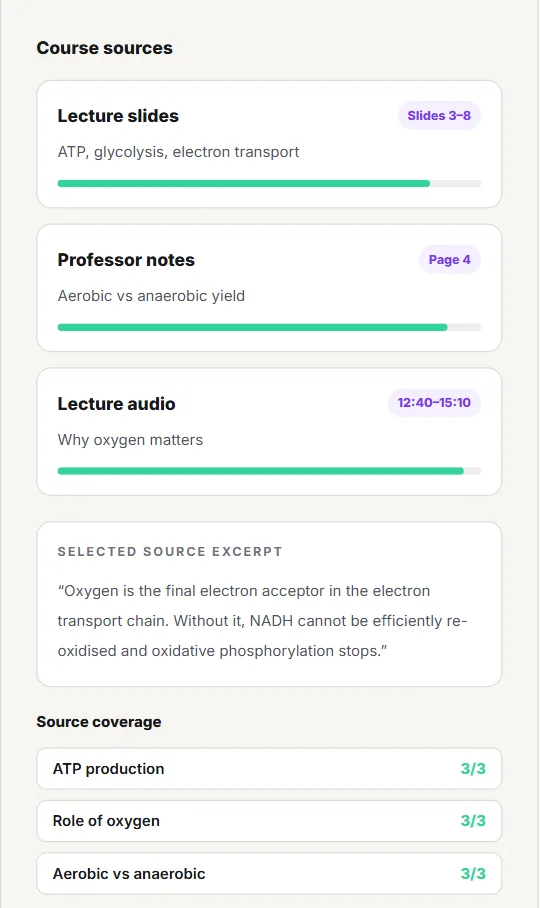
The row that most often decides the choice is "check every syllabus topic is covered". The panel above is what that looks like in practice: each source shows how much of it made it into the material, and each topic shows how many sources support it. In NotebookLM you can get the same answer by prompting, one source at a time.
Run a one-chapter acceptance test
Feature tables do not tell you how a tool handles your course. Upload the same chapter and syllabus section to both tools and ask each for a topic map, ten mixed-difficulty questions and the source location behind each answer. Then score 0-2 on four points:
| Criterion | 0 | 2 |
|---|---|---|
| Coverage | Several syllabus items missing | Every item present |
| Traceability | No usable source references | Every answer points to a slide or page |
| Fit to exam format | Generic recall only | Questions like the real exam (cases, calculations, oral) |
| Correction effort | You rewrote most items | Minor edits only |
Finish by answering three questions without notes. A tool that scores 7 or 8 out of 8 on your material is worth keeping, whatever the listicles say. For a repeatable version of the audit, use the AI study guide coverage workflow.
Scoring sheet and what the total means
Copy this sheet once per tool, fill it with the same chapter, and compare totals only after both tools have been scored.
| Criterion | Tool A (0-2) | Tool B (0-2) | Evidence you noted |
|---|---|---|---|
| Coverage | Syllabus items missing: [list] | ||
| Traceability | Answers without a slide or page: [n of 10] | ||
| Fit to exam format | Questions in the real exam style: [n of 10] | ||
| Correction effort | Items you rewrote: [n of 10] | ||
| Total | /8 | /8 | Recall without notes: [n of 3] |
| Total | What it usually means | Next step |
|---|---|---|
| 7-8 | The tool handles your material well | Keep it; spend your time on practice, not on switching |
| 5-6 | Usable, but one criterion is dragging it down | Fix the input first (better scans, the syllabus as a source, a stricter prompt) and rescore |
| 0-4 | The tool does not fit this course or exam format | Try the other tool on the same chapter before uploading more |
If you want to see what the test is looking for before uploading your own files, run it first on a fixed sample notebook: it shows source references, a coverage panel, a quiz and an oral prompt for one lecture.
Stay with NotebookLM when
- your main task is questioning, comparing and navigating sources;
- you have many long sources (research papers, reports) rather than one exam syllabus;
- you already use Anki or another scheduler for long-term review;
- the acceptance test gives you traceable answers with little correction.
Consider Memoniq when
- you want mixed files turned into several connected study formats;
- you need to see, and repair, what the material missed;
- your exam has an oral part, or speaking helps you recall;
- you need Anki, PDF, DOCX or PPTX export.
Using NotebookLM, Anki and Memoniq together
Most students who compare these tools end up using two of them. Three combinations that avoid doing the same work twice:
| Combination | Who does what | Watch out for |
|---|---|---|
| NotebookLM + Anki | NotebookLM to question sources and draft card text; Anki for scheduling | No documented export: you copy card text into a CSV yourself, so prune generated cards before importing |
| NotebookLM + Memoniq | NotebookLM for research-style reading across many papers; Memoniq for the exam notebook (up to 15 sources on Student) with coverage check and oral practice | Keep the exam notebook to the syllabus sources, not every paper you read |
| Any generator + a calendar | Whatever produced the questions; a date plan decides when you answer them | Put the topics on a dated review calendar, otherwise generated questions pile up unanswered |
Official sources used for this comparison
- Google Help: Upgrade Gemini Notebook (plans and usage limits), checked 24 Sep 2026
- Google Help: flashcards and quizzes, checked 24 Sep 2026
- Google Help: FAQ, source size limits, checked 24 Sep 2026
- Google: six ways students can use NotebookLM
- Google: public notebooks
- Anki FAQ: which spaced repetition algorithm (FSRS since 23.10)
Frequently asked questions
What is the best NotebookLM alternative for students?
It depends on the gap: Anki for long-term memorisation, a connected exam tool such as Memoniq for syllabus coverage and oral practice, a general chatbot for open-ended tutoring. Test two on the same chapter.
Has NotebookLM been renamed?
As of 24 September 2026, Google's help centre calls it Gemini Notebook and notebooklm.google redirects to notebook.google. Existing notebooks are the same product.
Does NotebookLM have flashcards and quizzes?
Yes. Google documents flashcards and quizzes in the Studio panel, with controls for language, number, difficulty and selected sources.
How many sources can I add to a NotebookLM notebook?
Google lists 50 sources per notebook on the free plan, 100 on Plus, 300 on Pro and 600 on Ultra, with each source up to 500,000 words or 200 MB. Google notes the limits can change. Rechecked on 25 September 2026: the upgrade page now lists 500 sources per notebook on Ultra.
Can I export NotebookLM flashcards to Anki?
Google's flashcard help page does not describe an Anki export. If your reviews live in Anki, check what can leave the notebook before generating many cards.
Is Memoniq better than NotebookLM?
Not universally. NotebookLM is stronger for exploring many sources; Memoniq is built for exam preparation, with coverage checks, spoken oral practice and Anki export.
Is there a free NotebookLM alternative?
Anki is free on desktop, and Memoniq has a free plan. New Memoniq accounts get 14 days of Student features without a card, then move to Free.
Keep reading
How to Study for In-House Exams in Medical School
In-house exams are written from your lectures. A per-lecture workflow, an AnKing decision tree, a sample lecture-day schedule and how pass/fail changes the balance.
How to Make Anki Cards From Lecture Slides with AI (Without a Bloated Deck)
AI drafts, you prune: a worked example on one slide, a neutral guide to tool types, CSV vs .apkg, image occlusion, cards per lecture and how to combine with AnKing.
How to Prepare for a Medical Viva Exam: Structures, Questions and a 4-Week Plan
An answer ladder you can say out loud, 16 classic viva questions with outline answers, a four-week plan, a five-criterion rubric and a safe way to practise with an AI examiner.
Roberto Coscia
Nursing graduate (BSc) · Founder of Memoniq
Sources are cited and checked at the end of the article. Medical content is educational: always verify against your course material. About the author · Editorial policy
Last updated: September 25, 2026